You applied to forty jobs. Heard back from two. The problem might not be your qualifications it might be that a machine is filtering you out before a human ever reads your resume.
Big companies in India, such as TCS, Infosys, Wipro, Deloitte, and Amazon, use an Applicant Tracking System. This helps them manage the many applications they get. A mid-sized IT company can get 500 to 2,000 applications for one fresher role in just 72 hours. No recruiter reads all of them. The ATS reads them first.
An ATS is software that reads your resume. It pulls out key details, scores them based on the job description, and sends a shortlist to a recruiter. Fixing formatting problems, adding keywords, and improving structure can boost your resume score. Then, you might get filtered out before anyone in hiring sees your name.
This guide shows how ATS works, what can ruin a resume during parsing, and how to fix common problems. At the end there is a checklist you can run against your resume before every application.
How ATS Actually Reads Your Resume
Understanding what the system does makes the fixes obvious. An ATS does not read your resume the way a person does. It does not notice that your layout is clean or that your summary is well-written. It does the following things, in roughly this order:
- Converts your file to plain text stripping all formatting, colours, and layout
- Identifies sections by looking for standard heading labels — Education, Experience, Skills, Projects
- Extracts key information from each section — job titles, dates, institutions, skills, keywords
- Compares the extracted keywords against the job description’s required and preferred terms
- Scores the resume and ranks it in the applicant stack
The critical word in step one is plain text. Every visual part of your resume—the two-column layout, icons, colored sidebar, and skill rating bars—disappears. What remains is raw text. If your two-column layout has your contact info in a table, the ATS may mix your name, email, phone, and summary into one messy block. It struggles with the column structure.
An ATS-friendly resume looks simpler than many Canva templates or resume builders. Here’s why: Simpler is not worse. It is correctly optimised for the system that reads it first.
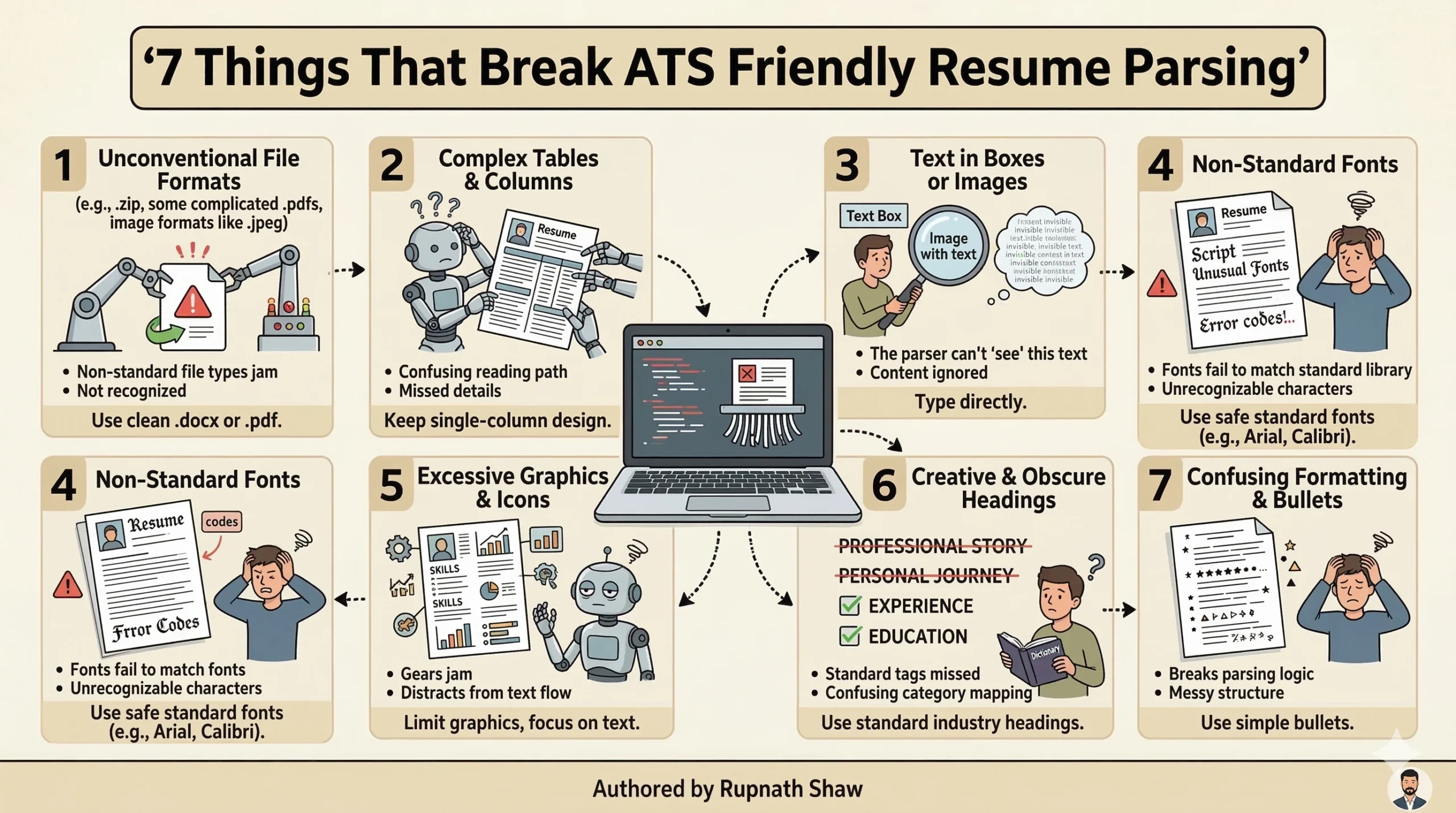
7 Things That Break ATS Parsing — And How to Fix Each One
1. Two-Column and Multi-Column Layouts
The most common ATS failure. Two-column templates split the resume into a left sidebar and a main content area. Most ATS systems read left to right, line by line. A two-column layout makes the system read lines alternately from both columns. So, it produces output like ‘Python SQL 3.8 CGPA’ instead of clear, separate fields.
| What breaks ATS | What to do instead |
| Two-column template with skills in a left sidebar and experience on the right — a Canva favourite | Single-column layout with one clean flow from top to bottom. All information in one column, read in the correct order. |
2. Using Text Boxes, Tables, or Headers for Key Information
Some templates use a text box or table cell for contact info, skills, or the candidate’s name. ATS systems frequently cannot extract text from these elements. Your name and email are the two key details on your resume. They might not be captured.
| What breaks ATS | What to do instead |
| Name and contact information placed in a styled header text box or table at the top of the page | Plain paragraph text at the top of the page. Name on one line, contact details on the next. No text boxes, no tables for contact information. |
3. Non-Standard Section Headings
ATS systems recognise standard section labels. If you rename them, the system may not recognise what information belongs where. Using ‘My Journey’ for ‘Experience,’ ‘What I Know’ for ‘Skills,’ and ‘Things I Built’ for ‘Projects’ can cause extraction errors.
| What breaks ATS | What to do instead |
| Creative section headings: ‘My Toolkit’, ‘Achievements’, ‘I Have Built’, ‘About Me’ | Standard labels that every ATS recognises: Skills, Education, Projects, Experience, Certifications, Summary |
4. Submitting as Word (.docx) Without Checking
Some ATS systems handle .docx better than others. The safest format for ATS compatibility is PDF. It keeps the text layer intact and won’t change with different software versions. However, a small number of older ATS systems actually parse .docx better. When a job description specifies a format, follow it. When it does not specify, submit PDF.
| What breaks ATS | What to do instead |
| Submitting .docx without knowing whether the ATS handles it correctly — formatting may collapse on opening | Submit PDF by default unless the job description explicitly requests Word. Name the file clearly: FirstName_LastName_Resume.pdf |
5. Missing Keywords From the Job Description
ATS scoring is largely keyword-based. If the job description mentions ‘Power BI’ and your resume says ‘Microsoft BI tool,’ the ATS won’t connect the two. It looks for the exact term or a close variant. Synonyms, abbreviations, and creative descriptions of the same skill all reduce your score.
Many candidates miss this fix. It needs careful reading of the job description. Instead of sending the same resume everywhere, tailor it to each job. Before you apply for a role, read the job description. Check if the skills and tools listed match what’s on your resume, using the same terms.
| What breaks ATS | What to do instead |
| Resume says ‘data visualisation tools’ and ‘Microsoft analytics software’ — job description says Power BI and Tableau | Match the exact terminology from the job description. If it says Power BI, your resume should say Power BI. If it says SQL Server, do not write ‘relational databases’. |
6. Skill Bars, Icons, and Progress Ratings
A skill bar that shows Python at 4 out of 5 stars looks professional in a resume template preview. The ATS reads it as nothing. The stars do not parse as text. Your skill level is invisible to the system. Worse — some ATS systems extract the visual element as garbled characters that corrupt the surrounding text.
| What breaks ATS | What to do instead |
| Skill rating bars, star ratings out of 5, percentage circles, or progress indicators for technical skills | Plain text skill list, categorised: Technical: Python, SQL, Power BI | Tools: Git, Jupyter Notebook, Excel |
7. Images, Logos, and Profile Photos
Images are completely invisible to ATS. A profile photo, company logo, or decorative graphic doesn’t help the ATS. In fact, it can interfere with text parsing. In Indian hiring for IT and analytics roles, photos are not required and add nothing useful.
| What breaks ATS | What to do instead |
| Profile photo at the top of the resume, company logos next to experience entries, decorative icons next to section headings | No images of any kind. Clean text only. Section headings can be bold or slightly larger — no icons needed. |
How to Find and Use the Right Keywords
Keyword matching is the core of ATS scoring. Getting it right does not require guessing. The job description tells you exactly which keywords matter for that specific role. Here is the process:
- Copy the full job description into a text document
- Highlight every technical skill, tool, and concept mentioned Power BI, SQL, Python, data cleaning, pivot tables, EDA, stakeholder reporting
-
Review your resume with the highlighted list. For each term from the job description that’s missing, think about whether you can honestly include it.
- Use the exact terminology from the job description, not a synonym or abbreviation
- Integrate keywords naturally in the skills section, in project descriptions, and in the summary
One important boundary: only add keywords for skills you actually have. ATS gets you through the first filter. The interview tests the claim. Adding Python to your resume when you cannot write a basic loop creates a problem the ATS cannot solve for you.
If you meet most but not all requirements, list your matching skills. Don’t make up the rest. A resume that matches 70 percent of a job description is a better use of your time. It’s smarter than sending out ten applications that only fit 30 percent each.
Pre-Submission ATS Checklist
Run this against your resume before every application. Fix anything marked as a fail before you submit.
| Check | Status | If you fail this check |
| Single-column layout — no sidebars or text boxes | ✓ Pass | Switch to a single-column Word or Google Docs template |
| No images, photos, icons, or skill rating graphics | ✓ Pass | Delete all images and replace with plain text |
| Standard section headings: Skills, Education, Projects, Experience | ✓ Pass | Rename creative headings to standard labels |
| Contact info in plain paragraph text — not inside a table | ✓ Pass | Move name and contact to a plain text line at the top |
| Keywords from the job description appear in your resume | ✓ Pass | Read the JD, identify key terms, add matching ones to skills and project bullets |
| Exact tool names match — Power BI not ‘BI tool’, SQL not ‘database query language’ | ✓ Pass | Find and replace synonyms with exact terms from the job description |
| File saved as PDF unless job posting requests Word | ✓ Pass | Export from Word or Google Docs to PDF before submitting |
| File name is professional: FirstName_LastName_Resume.pdf | ✓ Pass | Rename from Resume_v3_final.docx before submitting |
| No tables used to organise skills or experience sections | ✓ Pass | Replace table-based layouts with plain bulleted lists |
| Font is standard: Calibri, Arial, or Times New Roman | ✓ Pass | Change any decorative or display fonts to a standard choice |
Wrapping Up
An ATS-friendly resume is not a lesser resume. It is a resume that gets read by the system first, by a human second. The fixes are not complicated. They focus on removing design elements that look nice in templates. These elements often cause parsing failures in the software that processes your application.
- Single-column layout: the most important structural rule
- Standard section headings: so the ATS knows what each section contains
- No images, tables, or text boxes: these are invisible or disruptive to ATS parsing
- Keywords from the job description: use the exact terms, not synonyms
- PDF submission: preserves your formatting and text layer consistently
The ATS is the first audience for your resume. Design for that audience first. Once you clear the ATS filter, the human reading your resume will see everything else you put into it.
Read Also:
How to Build a Data Analyst Portfolio That Gets Interviews
Excel vs Power BI vs Tableau for Data Analysts (2026 Guide)
20 Highest Paying Companies Hiring Freshers in India (2026)
Job Notification Join us on Telegram: Click here
Job Notification Join us on WhatsApp: Click here