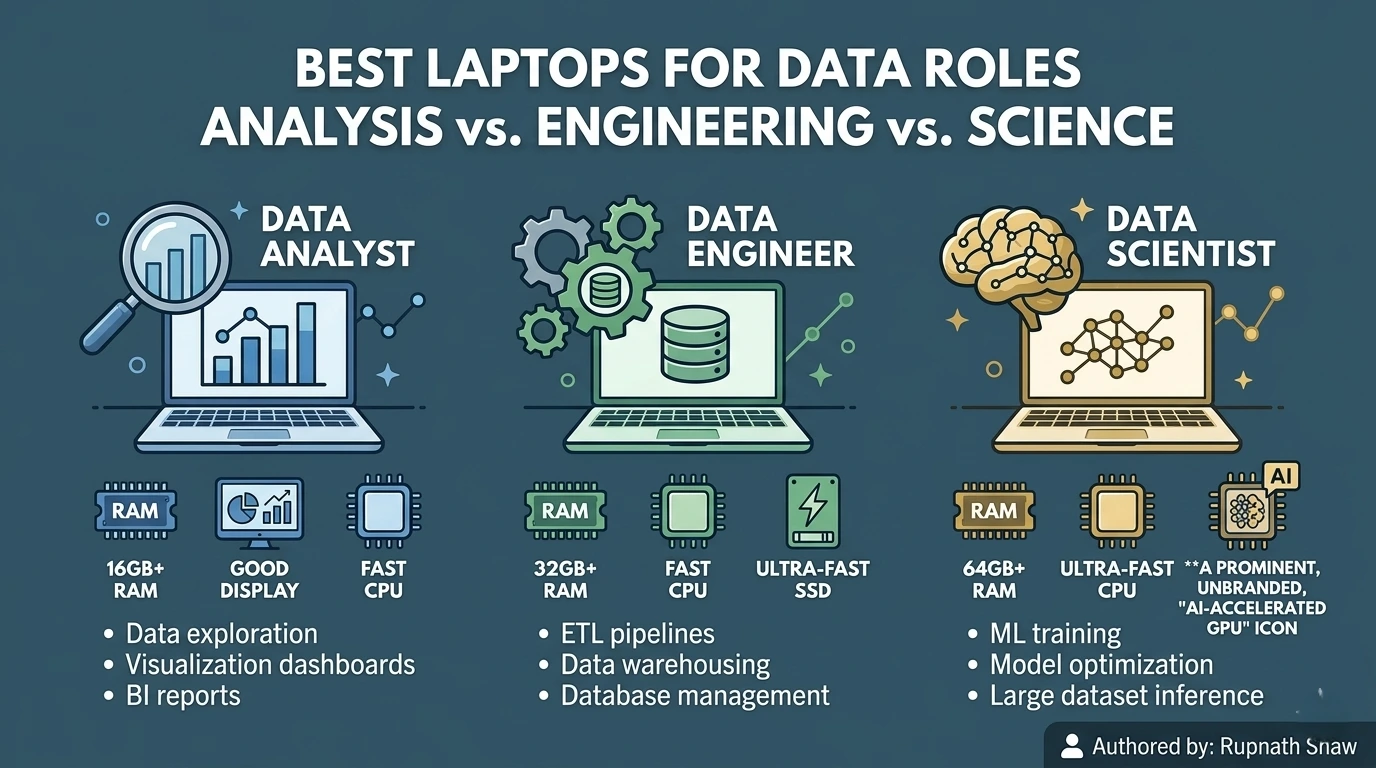
The wrong laptop does not stop you from doing data work. It just makes everything slower, hotter, and more frustrating. Here is how to choose the right one.
Data work is more demanding on hardware than most people realize before they start. Running a Jupyter notebook on a 50,000-row dataset is fine on almost anything. Merging 5 million rows in pandas is tricky. So is training a scikit-learn model with cross-validation. Running dbt transformations on a local database adds more complexity. The machine that felt quick in college now lags right when a deadline hits.
The good news is that you do not need a gaming rig.
Data work requires:
-
Fast single-core performance
-
Sufficient RAM for large datasets
-
A quick SSD for file operations
-
A battery that lasts all day
You don’t need a dedicated GPU unless you train deep learning models locally. Most analysts and engineers use cloud computing for this.
This guide covers eight laptops across three budget ranges. Each entry tells you the specs, the price in India, and specifically why it works or does not work for data roles. At the end, there is a Mac vs Windows verdict and a minimum spec baseline so you know exactly what you need before you buy.
The Specs That Matter for Data Work — and the Ones That Do Not
Before the list, a quick briefing on what to look for. Most laptop reviews are written for general consumers. Data work has specific requirements that those reviews do not priorities.
- RAM — the most important spec: 16GB is the minimum for comfortable data work in 2026. 8GB will struggle with large dataframes, multiple Jupyter kernels, and a browser open simultaneously. 32GB is ideal if you are running local databases, Docker containers, or dbt pipelines. Do not buy 8GB expecting to upgrade — most modern laptops have soldered RAM.
- CPU — single-core speed over core count: Data work is mostly single-threaded. A fast 8-core chip beats a slow 16-core one for pandas operations, SQL queries, and model training with small datasets. Apple Silicon (M3, M4) leads in single-core performance per watt by a significant margin in 2026. AMD Ryzen 7000 and Intel Core Ultra are the best Windows alternatives.
- SSD — NVMe only, 512GB minimum: Reading a 2GB CSV from an NVMe drive takes under 3 seconds. Reading the same file from a slow SATA SSD takes 20+ seconds. Every laptop on this list uses NVMe. Avoid any laptop that does not specify NVMe storage.
- Display: A 14 to 16-inch IPS or OLED panel at 1920×1200 or higher is comfortable for long working hours. High refresh rate (120Hz+) is nice but not a priority. Anti-glare coating matters more for a data analyst than color accuracy.
- Battery: Real-world 8+ hours. Data work with a browser, VS Code or Jupyter, and Slack open drains batteries fast. Apple Silicon laptops lead here too — 12 to 18 hours of real-world use on the M3/M4 chips is genuinely achievable.
- GPU — mostly irrelevant: Unless you are training deep learning models locally, an integrated GPU is sufficient. Most data engineering and analytics work uses the CPU entirely. Don’t pay a premium for a discrete GPU you won’t use.
Under Rs. 80,000 — Best Value for Analysts and BI Professionals
These laptops handle SQL, Python, Power BI, Tableau, and standard data analysis workflows without issue. They are the right choice for data analysts at any level who are not running heavy ML workloads locally.
- ASUS VivoBook 16X (AMD Ryzen 7 7730U)
| Price (India) | Chip | RAM | Storage | Display |
| Rs. 62,000 – 68,000 | AMD Ryzen 7 7730U | 16GB DDR4 | 512GB NVMe SSD | 16″ FHD+ IPS, 120Hz |
Verdict: Best budget pick for data analysts
The Ryzen 7 7730U is a mature, efficient chip that handles data wrangling and SQL operations comfortably. The 16GB RAM configuration is what makes this laptop viable for real work — not the 8GB variant. The 16-inch display gives you enough screen real estate to have a notebook and a browser side by side. Battery life is 7 to 9 hours with typical analyst workloads. The chassis runs warm under load but not uncomfortably so. Buy the 16GB/512GB configuration specifically — the 8GB version is a compromise that shows up quickly.
- Lenovo IdeaPad Slim 5 (AMD Ryzen 7 7730U / Ryzen 5 7530U)
| Price (India) | Chip | RAM | Storage | Display |
| Rs. 58,000 – 72,000 | AMD Ryzen 7 7730U | 16GB DDR4 | 512GB NVMe SSD | 14″ 2.8K OLED, 90Hz |
Verdict: Best display under Rs. 70K for analysts
The 2.8K OLED panel is the standout feature here. For analysts who spend hours on spreadsheets and dashboards, good display quality helps reduce eye strain. This is better than standard IPS panels. Performance is strong for analyst tasks. Jupyter notebooks, SQL clients, Power BI Desktop, and Excel all work well. The trade-off is battery life. OLED panels use a lot of power, so real-world battery life drops to 5 to 6 hours when in use. Carry the charger if you are working away from a desk.
Rs. 80,000 to Rs. 1,30,000 — Mid-Range Workhorses for Serious Data Work
This range gets you laptops that handle dbt pipelines, local database servers, larger ML model training, and multi-application workflows without slowdowns. Right for mid-to-senior data analysts, data engineers running local pipelines, and ML practitioners.
- Apple MacBook Air 15-inch (M3)
| Price (India) | Chip | RAM | Storage | Display |
| Rs. 1,09,900 – 1,29,900 | Apple M3 (8-core CPU, 10-core GPU) | 16GB Unified Memory | 512GB SSD | 15.3″ Liquid Retina, 500 nits |
Verdict: Best overall for data analysts in 2026
The M3 MacBook Air is the top pick for data analysts due to its long battery life and performance. It lasts 14 to 16 hours and handles big data tasks without overheating. The 15-inch screen is big enough for multitasking and it’s not too heavy. Get at least 16GB RAM and 512GB SSD for good performance.
- Lenovo ThinkPad E16 Gen 2 (AMD Ryzen 7 8845HS)
| Price (India) | Chip | RAM | Storage | Display |
| Rs. 85,000 – 1,00,000 | AMD Ryzen 7 8845HS | 16GB / 32GB DDR5 | 512GB / 1TB NVMe SSD | 16″ IPS, 1920×1200, 60Hz |
Verdict: Best Windows laptop for data engineers
ThinkPads are reliable in enterprise environments. The Ryzen 7 8845HS chip handles data engineering workloads well. The E16 laptop can be configured with 32GB RAM, making it suitable for memory-heavy tasks. The keyboard is great for typing. The display is average. This laptop is for users who prioritize reliability and performance over looks.
- Dell XPS 15 (Intel Core Ultra 7 155H)
| Price (India) | Chip | RAM | Storage | Display |
| Rs. 1,10,000 – 1,40,000 | Intel Core Ultra 7 155H | 16GB / 32GB DDR5 | 512GB / 1TB NVMe SSD | 15.6″ OLED 3.5K, 60Hz or FHD+ 120Hz |
Verdict: Best Windows premium pick for data scientists
The XPS 15 handles data science tasks well. It’s fast with multi-threaded work and has a great OLED display. However, battery life is only 6 to 7 hours and it runs warm. The 32GB RAM version is ideal for data science tasks. It’s a great option for analysts and data scientists using Windows.
Above Rs. 1,30,000 — High Performance for ML and Data Engineering at Scale
These machines do it all. They manage local LLM inference and train deep learning models on smaller datasets. They manage complex dbt pipelines. They run Spark in local mode. They also support heavy data engineering workflows. Perfect for senior data engineers, ML engineers, and data scientists. They manage heavy workloads locally, without relying on cloud computing.
- Apple MacBook Pro 14-inch (M4 Pro)
| Price (India) | Chip | RAM | Storage | Display |
| Rs. 1,99,900 – 2,29,900 | Apple M4 Pro (12-core CPU, 20-core GPU) | 24GB / 48GB Unified Memory | 512GB / 1TB SSD | 14.2″ Liquid Retina XDR, ProMotion 120Hz |
Verdict: Best laptop for data science and ML in 2026
The M4 Pro chip is best for data science work on a laptop. It has 24GB memory for handling big tasks at the same time. The Neural Engine speeds up some machine learning jobs. The battery lasts 18+ hours, so you can work all day. It’s expensive, but it lasts 5 to 6 years at full speed, making it a good investment for data scientists.
- ASUS ProArt Studiobook 16 (AMD Ryzen 9 + NVIDIA RTX 4060)
| Price (India) | Chip | RAM | Storage | Display |
| Rs. 1,40,000 – 1,70,000 | AMD Ryzen 9 8945HS + RTX 4060 | 32GB DDR5 | 1TB NVMe SSD | 16″ OLED 3.2K, 120Hz |
Verdict: Best for deep learning with local GPU
This laptop features a dedicated RTX 4060 GPU. It’s perfect for ML work using PyTorch, TensorFlow, and CUDA. It also features a fast Ryzen 9 8945HS chip and 32GB RAM. It weighs 2.4 kg. The battery lasts 4-5 hours under GPU load. It needs a large power adapter. So, it’s best for data scientists who need local GPU compute at their desks.
- Apple MacBook Pro 16-inch (M4 Pro / M4 Max)
| Price (India) | Chip | RAM | Storage | Display |
| Rs. 2,49,900 – 3,99,900 | Apple M4 Pro / M4 Max | 24GB / 48GB / 128GB Unified Memory | 512GB to 4TB SSD | 16.2″ Liquid Retina XDR, ProMotion 120Hz |
Verdict: Best-in-class for senior data engineers and ML engineers
The M4 Max with 48GB or more of unified memory stands out. It handles demanding tasks like local LLM inference and Spark in local mode with ease. The 16-inch screen is the best available. It’s costly, but for senior data or ML engineers, it’s a smart five-year investment. It removes daily workflow frustrations.
Mac vs Windows for Data Work — The Honest Verdict
This question comes up constantly. The honest answer in 2026 is that Apple Silicon has a clear advantage for most data roles, but Windows is the right choice in specific situations.
- Choose Mac if: You work primarily with Python, SQL, Jupyter, VS Code, dbt, and cloud services. Apple Silicon’s battery life and performance efficiency are unmatched for this stack. macOS also runs Unix natively terminal-based tools, Docker, and development environments set up faster and with fewer issues.
- Choose Windows if: Your company uses Windows-specific tools — Power BI Desktop’s full feature set is Windows only, certain SAP and Oracle data tools run only on Windows, and some enterprise data engineering environments are Windows-dependent. Windows is also the right choice if you specifically need a discrete NVIDIA GPU for local deep learning training.
- The RAM caveat: 8GB on Apple Silicon genuinely performs like 12 to 16GB on Windows for data workloads due to unified memory architecture. If comparing on paper, Apple’s 16GB feels like 24GB in practice.
Minimum Specs Baseline for Data Work in 2026
| Spec | Minimum (analyst) | Recommended (DE / DS) |
| RAM | 16GB | 32GB (Windows) / 24GB (Apple Silicon) |
| Processor | AMD Ryzen 5 / Intel Core i5 / Apple M2 | AMD Ryzen 7 / Intel Core Ultra 7 / Apple M3 Pro+ |
| Storage | 512GB NVMe SSD | 1TB NVMe SSD |
| Display | 14″ FHD IPS | 15–16″ IPS or OLED, 1920×1200+ |
| Battery | 7+ hours real-world | 10+ hours real-world |
| Weight | Under 2kg ideal | Under 2.5kg for portability |
Wrapping Up
Eight laptops across three budget tiers. The right one depends on your role, your workloads, and your budget.
- Under Rs. 80K: ASUS VivoBook 16X or Lenovo IdeaPad Slim 5 — get 16GB RAM, non-negotiable
- 80K to 1.3L: MacBook Air M3 for analysts prioritising battery and efficiency; ThinkPad E16 or Dell XPS 15 for Windows-dependent workflows
- Above Rs. 1.3L: MacBook Pro M4 Pro for data scientists and ML engineers; ASUS ProArt if you specifically need a local GPU
- Non-negotiables: 16GB RAM minimum, NVMe SSD, real-world 7+ hour battery, IPS display or better
Buy for the workloads you will run in two years, not the ones you run today. A data analyst who stays in the field will be running larger datasets, more complex pipelines, and heavier tools by 2027. The machine that just barely handles today’s work will be a bottleneck sooner than you expect.
Read Also:
Best Laptop for Cybersecurity Students in 2026
Best Cybersecurity Podcasts for Beginners in 2026
Best AI Certifications for Product Managers in 2026
Job Notification Join us on Telegram: Click here
Job Notification Join us on WhatsApp: Click here