The complete 2026 guide including the one thing most tutorials won’t tell you.
Search ‘Azure big data analytics’ and Azure Synapse is the first name you’ll see. It’s on job listings. It’s in interview prep guides. Your future employer’s data team almost certainly runs it. You start a tutorial and follow the steps. After about three hours, you begin to wonder if this is really what you should be learning.
Fair question. Microsoft has officially shifted its focus to Microsoft Fabric. Synapse Analytics is stable and used by millions of workloads worldwide. It’s in maintenance mode, so Microsoft is no longer focusing on it for future development. Most tutorials published before 2025 don’t mention this. Some published in 2026 still don’t. This one will.
That does not mean skip Synapse. Most job postings still list it. The SQL warehousing, Spark processing, and pipeline thinking you learn in Synapse apply directly to Fabric, idea for idea. Learning Synapse is not wasted time. But you should learn it with eyes open, knowing where things are headed.
This guide explains what Synapse is. It details how its three engines work and includes a free setup walkthrough. You’ll also find a real analyst portfolio project and a comparison of Synapse and Fabric. This will help you decide where to focus your time.
1. What Is Azure Synapse Analytics
Azure Synapse Analytics is Microsoft’s unified analytics platform. It combines a SQL data warehouse, Apache Spark processing, and a data pipeline tool. These features share a single web-based workspace called Synapse Studio.
Before 2019, you needed three Azure services:
-
Azure SQL Data Warehouse
-
Azure Databricks
-
Azure Data Factory
Connecting them was tough. Synapse combines these services into one.
Synapse has three engines. Knowing which one to use is the first skill an analyst must learn.
Key engines:
- Dedicated SQL Pool — A reserved data warehouse with pre-allocated compute. Best for recurring, structured queries at scale. Charges per hour whether you query it or not. Expensive if left running idle.
- Serverless SQL Pool — Queries data sitting in your Data Lake using T-SQL, with no warehouse needed. You pay per query. This is the right engine for learning and exploratory analysis fractions of a cent per run.
- Spark Pool — Runs Apache Spark for Python/PySpark processing of large, complex datasets. Built for engineers and Python-comfortable analysts. Not required for most entry-level analyst roles.
- Synapse Studio — The browser-based workspace where all three engines live side by side. Five navigation tabs: Data, Develop, Integrate, Monitor, and Manage.
2. How Data Flows Through Synapse – Architecture Without the Jargon
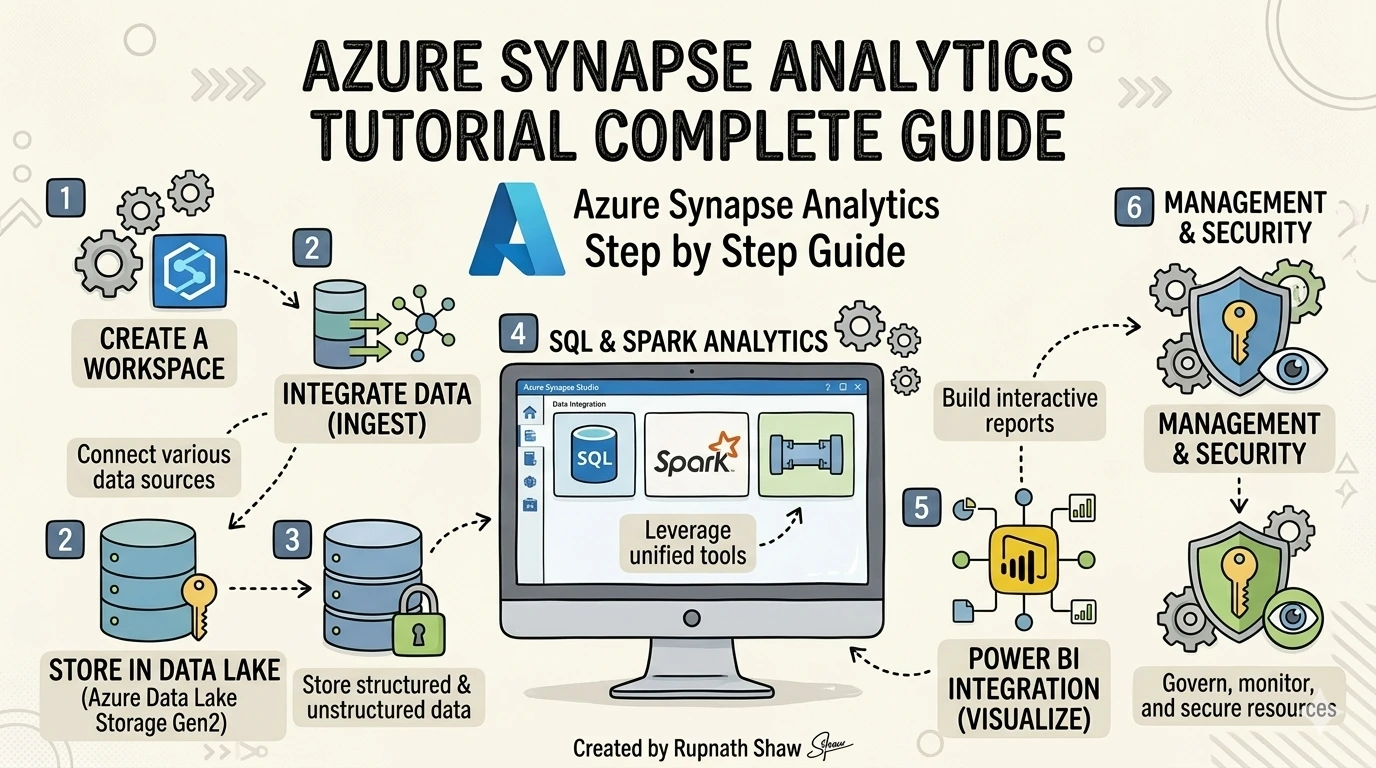
The standard Synapse architecture follows a simple path: raw source data lands in Azure Data Lake Storage Gen2, Synapse processes it using SQL or Spark, and the clean output feeds a Power BI dashboard. Everything connects inside Synapse Studio.
Three storage and compute concepts matter most for analysts. The Data Lake is your raw storage layer think of it as a cloud hard drive that holds CSV, Parquet, and JSON files. The SQL Pool is where structured, query-ready data lives. The Spark Pool is where Python-based transformations run at scale. You don’t need all three for every project.
Synapse also supports Massively Parallel Processing (MPP) meaning it splits a large query across multiple compute nodes and runs them simultaneously. That’s why Synapse can scan petabytes in seconds. For analysts, this translates to one practical rule: don’t optimize Synapse queries the same way you’d optimize a local SQL query. The engine distributes the work differently.
Key architecture terms to know:
- ADLS Gen2 — Azure Data Lake Storage Gen2. Your raw data storage layer.
- MPP — Massively Parallel Processing. Multiple nodes handle one query simultaneously.
- Synapse Link — Near-real-time integration with operational databases like Cosmos DB. No manual ETL required.
- Parquet — Columnar file format used in data lakes. Much faster for analytics than CSV at large scale.
3. Hands-On Setup – Create Your First Synapse Workspace for Free
This is the section competitors hide behind a paywall or skip entirely. Every step below uses the Azure free account tier — the Serverless SQL Pool costs fractions of a cent per query, so you can run this walkthrough for well under a dollar.
You need two things before starting: an Azure free account and basic T-SQL knowledge (SELECT, FROM, WHERE, GROUP BY). Nothing else is required.
Step-by-step setup:
- Step 1: Create a Resource Group — Log into portal.azure.com. Search ‘Resource Groups’, click Create. Name it synapse-learning-rg and choose a region close to you (East US or Southeast Asia for India-based users).
- Step 2: Create an ADLS Gen2 Storage Account — Search ‘Storage Accounts’, click Create. Enable the Hierarchical Namespace option under the Advanced tab. This is what makes it a Data Lake, not just blob storage.
- Step 3: Create the Synapse Workspace — Search ‘Azure Synapse Analytics’, click Create. Point it to the storage account you just created. Set a SQL admin username and password you’ll remember.
- Step 4: Open Synapse Studio — Inside your workspace resource, click ‘Open Synapse Studio’. This is your working environment. Explore the five tabs: Data (your storage), Develop (SQL and notebooks), Integrate (pipelines), Monitor (job history), Manage (pools and settings).
- Step 5: Run your first serverless query — In the Develop tab, open a new SQL script. Select ‘Built-in’ as the SQL pool (this is the serverless option). Run: SELECT TOP 10 * FROM OPENROWSET(BULK ‘https://azureopendatastorage.blob.core.windows.net/nyctlc/yellow/puYear=2018/puMonth=1/*.parquet’, FORMAT=’PARQUET’) AS result; — this queries public NYC taxi data directly from a Data Lake at zero cost.
Mistakes to avoid:
- Firewall errors – Go to Manage > Networking and add your current IP address. Most connection failures trace here.
- Using Dedicated Pool for learning It charges per hour. Always use the Built-in (Serverless) pool for practice.
- Skipping resource tags – Tag everything with project=learning and env=dev so you can track costs.
4. Real Analyst Project – Retail Sales Performance Dashboard
Portfolio projects are what convert a certificate into a job interview. This project uses real tools and produces something you can genuinely link to on a resume or LinkedIn profile.
Business question: Which product categories generate the most revenue, and how does performance vary by region and quarter? Dataset: AdventureWorks Sales Data (free download from Microsoft’s sample datasets GitHub repository or Kaggle search ‘AdventureWorks CSV’).
Project steps:
- Step 1: Upload — Download the AdventureWorks CSV files. In Synapse Studio, go to Data > Linked > your storage account. Create a container called raw-data and upload the files.
- Step 2: Explore with Serverless SQL — In a new SQL script (Built-in pool), write: SELECT TOP 100 * FROM OPENROWSET(BULK ‘https://[yourstorage].blob.core.windows.net/raw-data/sales.csv’, FORMAT=’CSV’, HEADER_ROW=TRUE) AS data; confirm the data loaded correctly.
- Step 3: Transform — Write an aggregation query: SELECT ProductCategory, Region, DATEPART(QUARTER, OrderDate) AS Quarter, SUM(Revenue) AS TotalRevenue FROM OPENROWSET(…) AS data GROUP BY ProductCategory, Region, DATEPART(QUARTER, OrderDate) ORDER BY TotalRevenue DESC;
- Step 4: Connect to Power BI — Open Power BI Desktop. Get Data > Azure > Azure Synapse Analytics SQL. Enter your Synapse workspace serverless endpoint (found under Manage > Properties in Studio). Build a bar chart (Revenue by Category) and a map visual (Revenue by Region).
- Step 5: Document it — Write a GitHub README with: business question, dataset source, tools used (Synapse Serverless SQL, ADLS Gen2, Power BI), SQL queries, and a screenshot of the dashboard.
What this demonstrates to employers:
- T-SQL querying against cloud-stored data
- Azure Data Lake integration and file format handling
- End-to-end pipeline thinking: raw data to business insight
- Power BI reporting connected to a cloud analytics platform
5. Synapse vs Microsoft Fabric – The Honest 2026 Answer
Microsoft Fabric is the future of Azure analytics. That’s not speculation it’s official Microsoft positioning. Fabric unifies everything Synapse does (and more) into a single Software-as-a-Service platform with OneLake at the center. Synapse is being maintained, not extended.
The practical meaning for an analyst in 2026: if your current employer runs Synapse, learn Synapse. If you’re starting fresh or your company is planning a migration, pair your Synapse knowledge with Fabric fundamentals. The good news is that every concept maps across directly.
| Synapse Feature | Maps To in Fabric | What It Means For You |
| Dedicated SQL Pool | Fabric Data Warehouse | Same SQL logic, new home |
| Serverless SQL Pool | Fabric SQL Analytics Endpoint | Query your lake without a warehouse |
| Spark Pool | Fabric Data Engineering | PySpark notebooks, same concepts |
| Synapse Pipelines | Fabric Data Factory | ADF-style orchestration, unified |
| Synapse Studio | Fabric Workspace | Unified UI, broader feature set |
Nothing you learn in Synapse is wasted. The SQL skills, the Data Lake thinking, the pipeline concepts they transfer. Synapse is a sensible place to start. Fabric is where those skills grow.
6. Azure Synapse in the Job Market – What Employers Actually Ask
Job postings for Azure data analyst roles in India often mention key skills. These include:
-
T-SQL
-
Power BI
-
ADLS Gen2
-
Increasingly, PySpark
Synapse is also frequently highlighted.
Synapse isn’t the only tool you need. It’s part of a larger Azure stack that employers want you to handle.
Companies hiring for Synapse roles in India include:
-
TCS
-
Infosys
-
Wipro
-
Cognizant
-
Deloitte India
Salary ranges start around 8 LPA for junior roles. They can reach up to 25 LPA for senior engineers with experience in Fabric and Synapse.
Interview questions worth preparing:
- What is the difference between Dedicated SQL Pool and Serverless SQL Pool and when do you choose each?
- When would you use Spark instead of SQL in a Synapse project?
- How does Azure Synapse integrate with Power BI?
- What is ADLS Gen2 and how does it differ from regular Blob Storage?
- What is Microsoft Fabric and how does it relate to Synapse?
Wrapping Up
Azure Synapse Analytics is a production-grade platform. It includes key concepts such as SQL data warehousing, Data Lake integration, and Spark processing.
What this guide covered:
- What Synapse is and how its three engines (Dedicated SQL, Serverless SQL, Spark) work
- The standard data architecture: Data Lake to Synapse to Power BI
- A free, step-by-step workspace setup using Serverless SQL Pool (no surprise costs)
- A complete analyst portfolio project – Retail Sales Performance Dashboard
- An honest Synapse-to-Fabric comparison table with direct concept mapping
- India job market context: companies hiring, salary ranges, interview questions
Learn Synapse with clarity about where it sits in 2026. Then take the next step toward Microsoft Fabric the same foundation, broader possibilities.
Read Also:
Top Startups Hiring Freshers in India (2026 Edition)
50 SQL Interview Questions for Data Analysts With Answers
Job Notification Join us on Telegram: Click here
Job Notification Join us on WhatsApp: Click here